Product launch: Smart Inbox
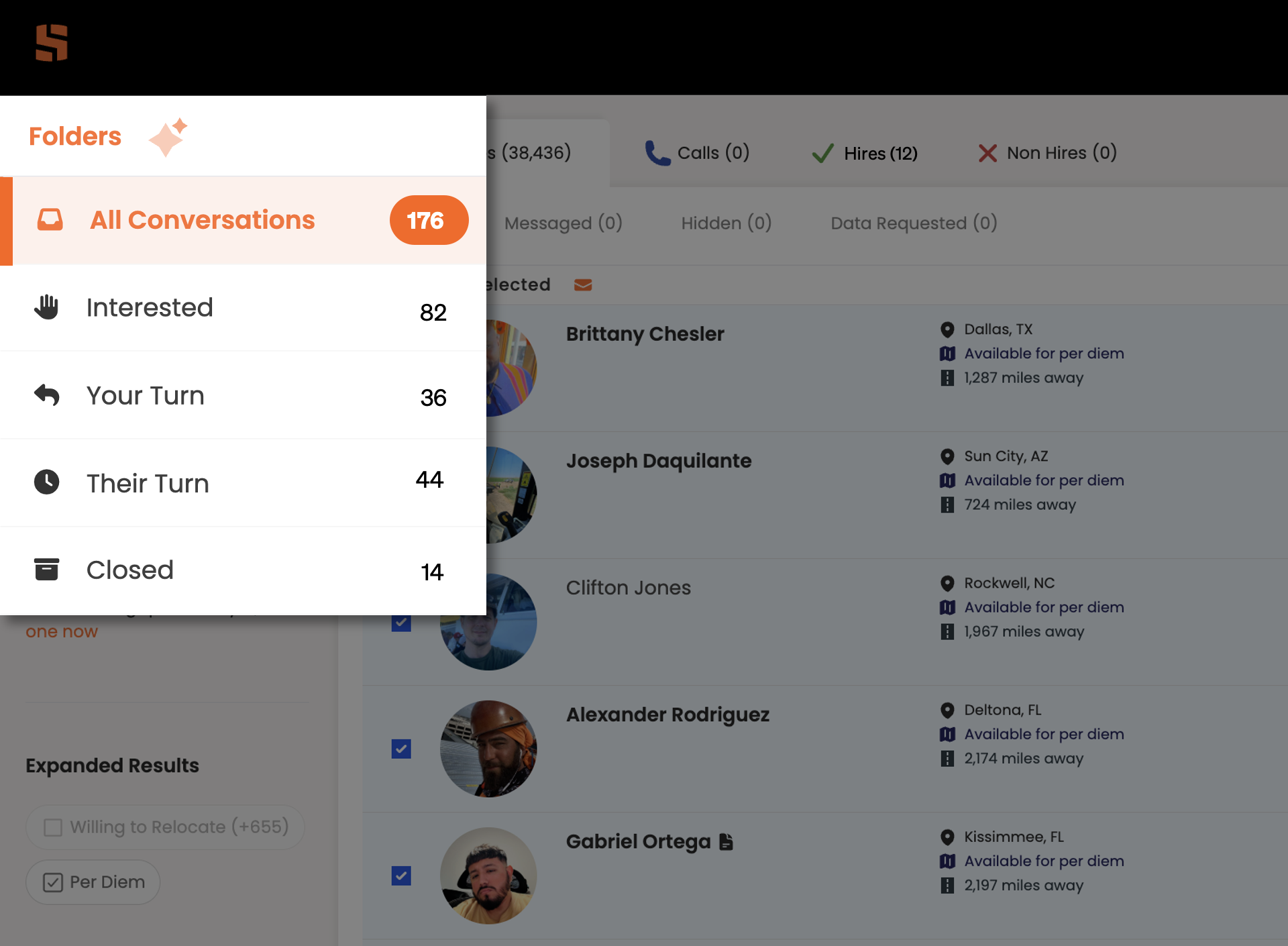
Smart Inbox is designed to help craft recruiters efficiently manage all communications with craft workers. Unlike a traditional email inbox, the Smart Inbox automatically organizes conversations into stages that mirror your hiring funnel, helping you maintain momentum with qualified candidates and ensuring no opportunity falls through the cracks.
It features five distinct stages, each designed to help you quickly identify which conversations need your attention and what action to take next. These are:
All conversations
Interested
Your turn
Their turn
Closed
Each stage in the Smart Inbox serves a specific purpose in your recruiting workflow. Here's what to expect and how to use each one effectively.
Stage 1: All conversations
What it is: This is your master view. A complete aggregation of every conversation across all stages, with a running count displayed next to the stage name.
What you'll find here: All active and closed conversations, including those waiting for worker responses, those needing your response, interested candidates, and archived conversations.
How to use it: Use this stage as a dashboard for high-level monitoring rather than day-to-day management. For actual workflow management, work from the specific stages below, which are designed to help you prioritize and take action efficiently.
Best practice: Check this occasionally to see overall volume, but do your actual recruiting work in the targeted stages.
Stage 2: Interested
What it is: This stage automatically captures workers who have clicked the 'Interested' button in response to your outbound messages on the Skillit platform.
What you'll find here: Hot leads! Workers who have explicitly expressed interest in learning more about your opportunity will be in here. These candidates are the most engaged and likely to convert.
How to use it: Prioritize this stage for quick follow-up. These workers have raised their hand and are expecting to hear from you. Respond promptly with next steps, additional details, or interview scheduling.
What to expect: Workers will remain in this stage until you engage with them and the conversation progresses. It’s best to jump on these asap as these are workers actively looking for jobs.
Best practice: Check this stage multiple times daily and aim to respond to interested candidates within hours, not days.
Stage 3: Your turn
What it is: This is your action inbox, conversations where the worker sent the most recent message and is now waiting for your response.
What you'll find here: Active conversations requiring your attention. This includes workers responding to your initial outreach, answering questions you asked, providing availability, or continuing ongoing discussions.
How to use it: Review each conversation and determine if it needs a substantive response or can be archived.
What to expect: You may also see negative responses here, such as workers who replied 'Not interested' via message instead of using the platform button. Review these to understand objections and close as need to keep inbox clean.
Best practice: Make this stage part of your daily routine. Keeping this clean demonstrates responsiveness and maintains candidate momentum.
Stage 4: Their turn
What it is: This stage holds all conversations where you sent the last message and the ball is now in the worker's court to respond.
What you'll find here: Pending responses from workers. This includes your initial outreach messages that haven't received replies yet, as well as ongoing conversations where you're awaiting answers to questions, schedule confirmations, or next steps acknowledgment.
How to use it: Monitor this stage to identify which conversations may need follow-up. After initial outreach, most messages will start here. If workers don't respond within your preferred timeframe (3-5 days is typical), you can send a follow-up, or if appropriate, move them to 'Closed' to keep your active pipeline clean.
What to expect: This will likely be your largest stage, especially after bulk messaging campaigns. Conversations automatically move to 'Your Turn' when workers respond.
Best practice: Set a follow-up cadence (e.g., 3 days, then 7 days) and systematically review this stage to identify unresponsive candidates who should be closed or re-engaged.
Stage 5: Closed
What it is: This is your archive—a holding area for conversations you've decided not to pursue further, along with the reasons why.
What you'll find here: Candidates who are no longer active prospects, including those who declined the opportunity, stopped responding, weren't a fit, accepted other positions, or for any other reason you've documented.
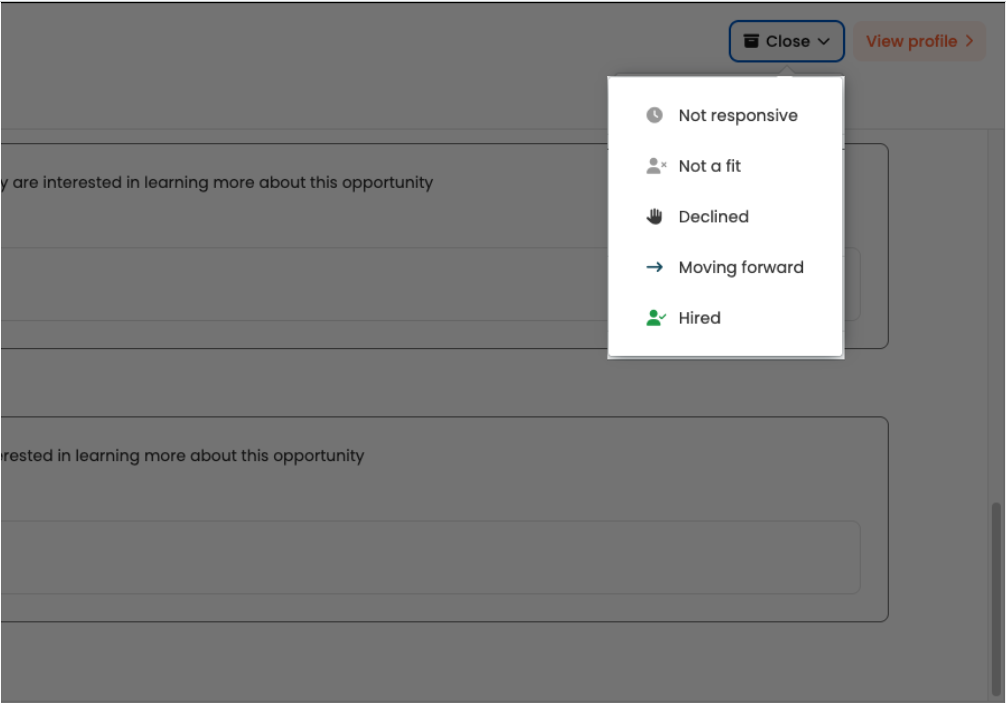
How to use it: To close a conversation, click on any worker's message, then select the 'Close' button in the top-right corner. You'll be prompted to provide a reason, which helps you track closure patterns and maintain organized records. Closing a candidate is reversible—if circumstances change, simply click 'Re-open' to restore them to their previous active stage.
What to expect: Closed conversations are archived but not deleted. If a candidate situation changes (e.g. the reach out and say they are actually interested) you can remove a candidate from the closed list and add them back to an active stage of the Smart Inbox by clicking the “Re-open” button in the top right corner. This is particularly valuable for unresponsive candidates who suddenly become active again, or when roles reopen and you want to re-engage past prospects.
Best practice: Close candidates liberally to keep your active stages focused. Document clear closure reasons to build institutional knowledge for future recruiting efforts.
Putting it all together in your daily workflow
The Smart Inbox is designed to keep your hiring funnel moving efficiently. Here's a recommended daily workflow:
Start with interested: Check for new interested candidates first and respond immediately to capture hot leads.
Clear your turn: Review and respond to workers who are waiting on you, or close conversations that don't require further action.
Monitor their turn: Identify candidates who need follow-up or should be moved to Closed after a reasonable waiting period.
Maintain closed: Periodically review this stage to identify candidates worth re-engaging for new opportunities.
By working systematically through these stages, you'll maintain momentum with qualified candidates, ensure no opportunities slip through the cracks, and build a more efficient, effective recruiting process.
The Smart Inbox transforms worker messaging from a chaotic stream into an organized, actionable workflow. Whether you're using Skillit's bulk messaging feature or sending individual messages, every conversation is automatically categorized to help you focus on what matters most: connecting qualified craft workers with great opportunities.
Smart Inbox just got smarter
What's new: cleaner close-outs, sharper signal
Smart Inbox keeps getting better. Two recent updates make the close-out process more useful, both for keeping your workflow clean and for improving what the platform learns about your hiring preferences.
A new "moving forward" option. Not every promising conversation ends in a hire logged on the platform. Sometimes a worker moves to a phone screen, a site visit, or a qualifying call that happens outside of the Skillit platform. Previously, those conversations sat in your inbox without a clean way to resolve them. Now you can archive with a "moving forward" status that reflects what's actually happening, without miscounting it as a formal hire or a decline. Your queue stays accurate, and so do your metrics.
Decline reasons = Better matching. When you pass on a worker, we now collect the reason consistently across every point in the product where a decline can happen. That feedback goes directly into improving match quality, with fewer workers who aren't the right fit showing up in your results over time. The more consistently it's captured, the faster the platform learns what good looks like for your specific roles and markets.
Taken together, these two changes mean every close-out is doing something useful: either clearing noise from your queue or giving the platform signal it can act on.